
Setting a dataset's default sort
By default, a dataset's records aren't sorted in any particular order. You can define one or more fields to sort by — the first field is the primary sort, and any additional fields act as tie-breakers when records share the same value on the fields before them.
This same setting controls both the table view and every export format — there's one default sort to configure, not separate settings for each.
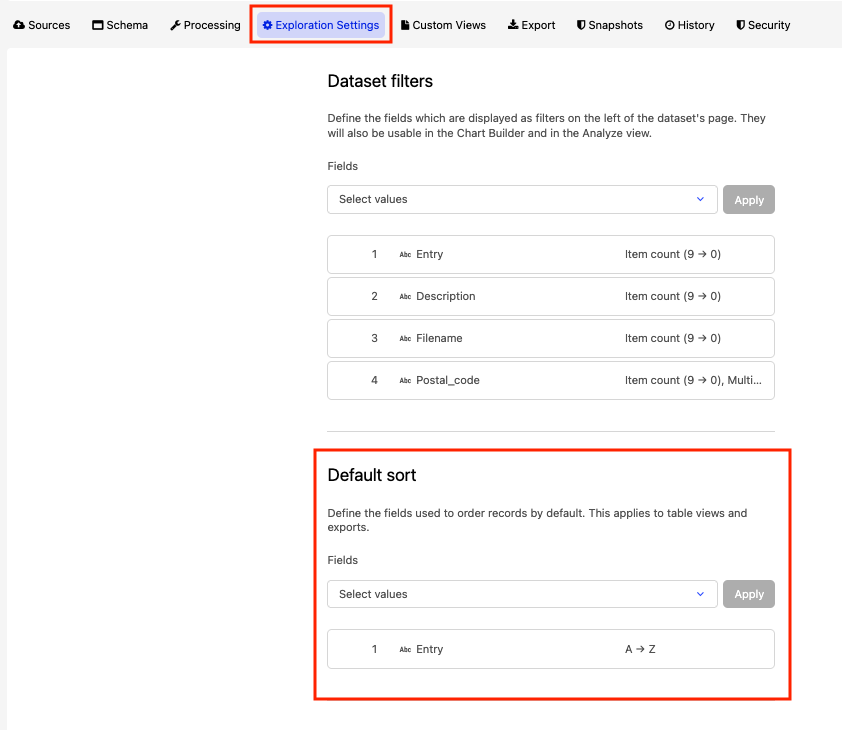
In your back office, go to your dataset, click Edit content, and select the Exploration Settings tab.
Under "Default sort," select the fields you want to sort by.
Note that only fields that are sortable can be selected here.
For each field, choose ascending or descending order.
Reorder the fields if needed — drag them, or use the up/down arrows — to set which one sorts first.
Click Apply.