
How to search your data with AI (vector search)
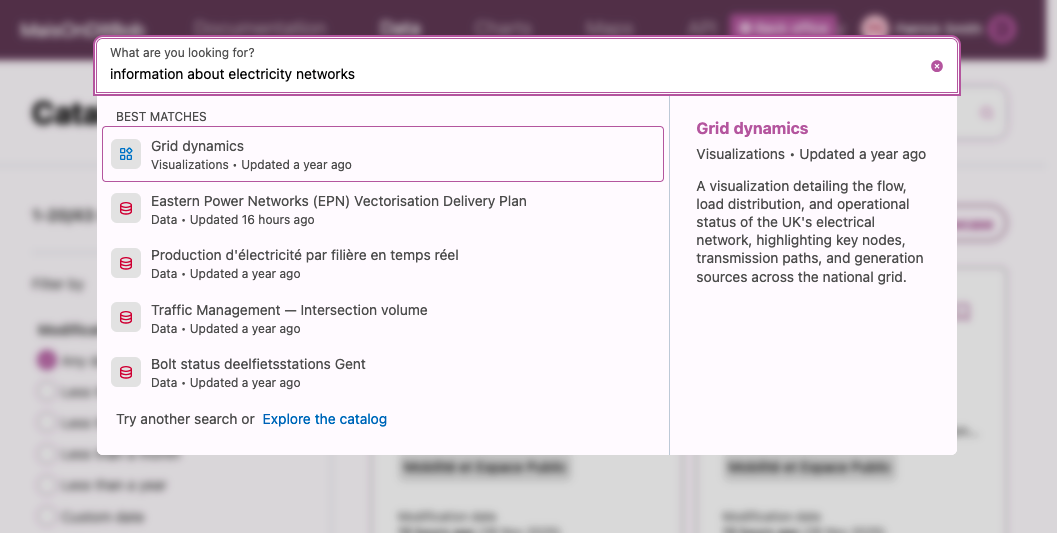
Going beyond traditional search
Our vector search is designed to be more powerful and easy to use than a traditional search. To get the best results, though, it helps to realize that it works differently than a traditional keyword search.
As with other generative AI tools, a search made with a question or a phrase will be more effective than a single word. To get the best results, don't hesitate to be detailed.
Then, if filters are available, you can use those to refine your results.
Different and more flexible
If you know exactly what you're searching for—perhaps even what it's called—a traditional search might do the job just fine. But supposing you're not sure what you're looking for—or even if it exists—a vector search can help.
It's more creative and casts a wider net, so be as specific as you can. Of course, even with the vector search in your header, your portal's sidebar (under "Filters") still uses the traditional search method.
But using the vector search, then refined using filters, is a consistently powerful and effective search method.
How it works
Vector search represents an evolution of search technology. Unlike traditional keyword-based search, vector search uses artificial intelligence to understand the meaning of a query.
Technically, this works by converting words into numerical vectors that represent their meaning in a high-dimensional space. This makes it possible to find results by calculating the semantic similarity between the query and the data assets on your domain. You can think of it like a cloud, where the more similar the droplets of water are the closer they are to each other.
This powerful technology offers an alternative to how we traditionally search for datasets, by providing a wider range of relevant results, even when the exact keywords are not used in the query.
Each time a data asset is published, an automatic indexing process is triggered. Note that this process meticulously catalogs the asset's metadata —not the data itself:
Title
Description
Keywords
Themes (dataset categories)
Territory (countries, regions, departments, municipalities, etc.)