
Using a business glossary in Huwise
In the data markeplace experience, all clients can configure a business glossary.
A business glossary allows you to standardize the terms and definitions your organization uses, and makes them instantly available to your end users, in context, as they navigate your data marketplace.
Our goal is to create a single environment in which your users can independently find and use the data they need. This simple but effective feature makes your data that much more accessible, that much easier to use.
The user experience
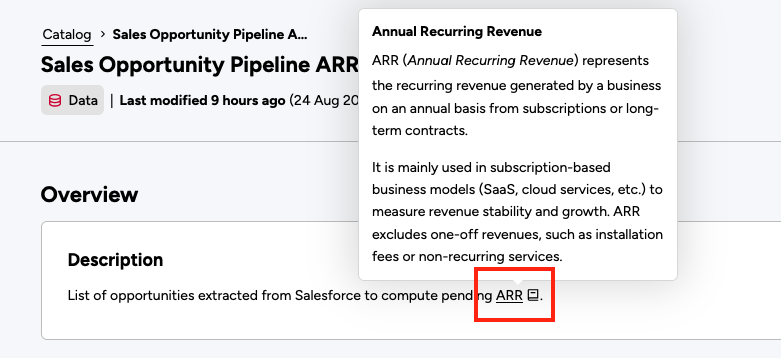
Once you’ve defined terms in your glossary, whenever the user encounters terms with definitions in your assets’ descriptions, those terms are underlined and the definition is provided when the user hovers over them. If a user clicks on the term itself, it opens a glossary where they can search for and consult other terms.
Note that a glossary may be available in the portal's header, if the portal's admin has chosen this configuration.
Configuring your glossary
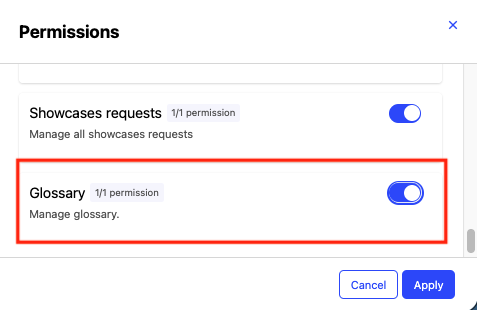
If you’re an admin or "Glossary" is toggled on in your permissions, you have access in the back office to Catalog > Glossary.
On the Glossary tab you’ll see your list of terms. Naturally, when you start out, this list is empty. Click Create a term to get started.
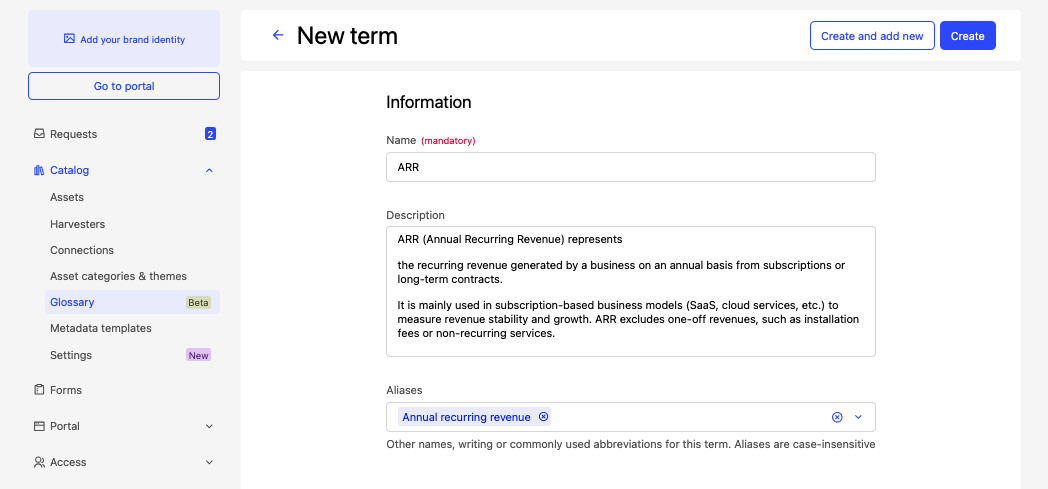
Fill in the term’s name and definition. Under “Aliases,” you can provide the other versions, spellings, or abbreviations of the term for which you also want the definition provided.
Note that a term's name is limited to 255 characters and its definition to 2,000 characters. You can add up to 10 aliases per term, with a maximum of 255 characters each.
Adding the glossary to your portal's header
To add a link to the glossary to your portal's header, in your back office go to Portal > Navigation > Header menu.
Click on Add menu item, check the "Glossary," and provide the desired text for the link.
Bulk uploading terms
Bulk uploading glossary terms is not currently available through the platform interface. However, glossary terms can be created and managed through the Huwise Automation API. See the API documentation for the necessary endpoints. The size limits described in Configuring your glossary also apply to terms created through the API.