
FTP with meta CSV harvester
This harvester allows you to create datasets from an FTP folder.
It connects via FTPS (explicit mode on port 21) if available, or FTP if requested in the provided URL.
The FTP folder must contain:
One metadata CSV file (separated with semicolons by default)
Several resources
(Optional) several CSV schema files
The FTP with meta CSV harvester only supports UTF-8 encoding.
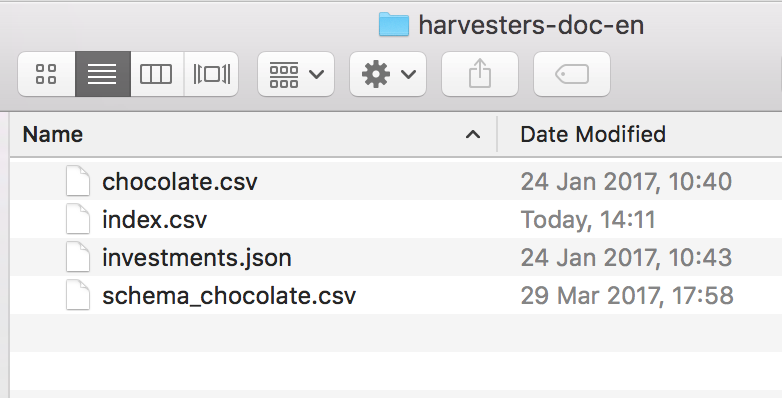
Metadata CSV file
The metadata CSV file is a file whose values are separated by semicolons (by default) and that contains:
One header row
Several other rows, each one dedicated to a dataset to harvest
Example:
name;title;description;theme;keyword;source_dataset;schema_file
Row ID 1;Chocolate bars database;"A database of chocolate bars";Health;Chocolate;chocolate.csv;schema_chocolate.csv
Row ID 2;Venture Capital Investments;Venture capital industry statistics.;Economy, Business;"Venture capital;Investments;IPO;Acquisitions";investments.json;
name | title | description | theme | keyword | source_dataset | schema_file |
Row ID 1 | Chocolate bars database | A database of chocolate bars | Health | Chocolate | chocolate.csv | schema_chocolate.csv |
Row ID 2 | Venture Capital Investments | Venture capital industry statistics. | Economy, Business | Venture capital;Investments;IPO;Acquisitions | investments.json |
|
The
namecolumn must contain a unique identifier for each row. If the CSV has notitlecolumn, thenamevalue is used as the dataset's title.Note that the name does not define the technical IDs for the harvested datasets, which are produced automatically by the platform based on the title, or name if the title is not defined.
The CSV resource column (
source_datasetby default) contains the resource for each row.The optional CSV schema column (here,
schema_file) contains the schema file for each row.Every other column is a piece of metadata (see the table below for the complete list of accepted column names).
Use double quotes at the beginning and end of lists like keyword, where you have to use semicolons to separate words (e.g "keyword1;keyword2").
Accepted metadata columns
Template | Column name |
Standard |
|
Custom |
For example, if the metadata name is "project name", use
|
DCAT (if activated) |
|
DCAT-AP for CH (if activated) |
|
Inspire (if activated) |
|
Semantic (if activated) |
|
The table above lists the most common templates, but you can use the fields of any metadata template activated on your portal, such as DCAT-AP or Dublin Core. Name the column the same way as in the DCAT or INSPIRE rows: the template's technical ID, a period, then the field's technical ID. For example, a column named dublin-core.title fills in the Dublin Core template's title.
If you leave the modified column out or empty, the harvester fills in the dataset's "Display modification date" with the date the resource file was last modified on the FTP server instead. This only works for files on the FTP server, not for resources given as a URL.
For more information about the standard metadata, see this page.
The geographic_reference_auto metadata
The geographic_reference_auto column defines whether the dataset's geographic coverage is automatically computed and accepts a Boolean value:
Value | Purpose |
| Sets the Geographic coverage metadata for the dataset to Automatic. The geographic coverage is automatically computed based on the dataset content or on the domain's dataset default geographic coverage. |
| Sets the Geographic coverage metadata for the dataset to the value for |
The geographic_reference metadata
The geographic_reference column defines the location used for the dataset geographic coverage, which means the Geographic coverage metadata for the dataset is set to Specific. This geographic_reference column contains an array of georeference unique identifiers representing locations.
Georeference unique identifiers use the following syntaxes based on the reference:
Reference | Description | Syntax | Example value |
world | The dataset contains content about different countries |
|
|
country | The dataset contains country-level content |
|
|
lower division | The dataset contains content about a specific country division |
|
|
{{country code}}is a two-letter country code defined in ISO 3166-1 alpha-2. For example,frfor France.{{administrative-level}}is an administrative level for the country. For example,40is the administrative level for French regions. For more information about the administrative levels available for the desired country, see here.{{administrative division}}is the relative administration division within the country's administrative level. For example,11is the code for the Île-de-France French region.
You can retrieve the desired administrative division code as follows:
Go to the documentation.
From the table at the end of the section, select a country and an administrative level.
From the related table row, click the link in the Dataset URL column to open the related geographical referential and get the desired administrative division code.
Resources
Resources can either be:
Files on the FTP server, in the same folder as the
index.csvfile, or under a subdirectory by specifying the relative path to the file in the column (e.g "resources/chocolate.csv")Any URL pointing towards a supported format
If the column is empty, the dataset will contain only metadata.
To attach several files to the same dataset, put them all in the same cell, separated by semicolons. As with keyword lists, enclose the cell in double quotes, for example "chocolate_2024.csv;chocolate_2025.csv". The harvester then adds each file to the dataset as a separate resource. This only works for files on the FTP server. A URL is always treated as a single resource.
Resources in any format supported by the platform can be harvested. However, as the harvester heavily relies on automatically detecting parameters for the connector's configuration, files must be simple enough to be correctly extracted.
Schema CSV file
For each resource, the FTP folder can contain a CSV schema file that defines labels and descriptions for each field of the dataset.
The file name of each schema file must be written in the CSV schema column. This file has the following specifications:
A
namecolumn holds each field name in lowercase (e.g. on a CSV resource, this would be the column names in lowercase)A
labelcolumn (optional) holds the label of the corresponding fieldA
descriptioncolumn (optional) holds the description of the corresponding field
name;label;description
company;Company;The company that makes the bar
ref;Reference;The product id of the chocolate bar
Name | Label | Description |
company | Company | The company that makes the bar |
ref | Reference | The product id of the chocolate bar |
The schema files do not need to contain a row for each field, and it is not required to provide a schema file for each dataset in the index.csv. In the latter case, keep the corresponding cell empty.
Parameters
Name | Description | Example |
Host (host) | URL of the FTP server | eu.ftp.huwise.com, ftps://eu.ftp.huwise.com, ftp://eu.ftp.huwise.com |
User (user) | Your username |
|
Password (password) | Your password |
|
Subdirectory (subdir) | The directory containing the data you want to harvest | pub/documents |
CSV separator for metadata and schema files (csv_separator) | The character that separates the columns in the metadata CSV file and in the schema files | ; |
Metadata CSV filename (metadata_file) | The file holding the metadata and filenames (see above for more precise specifications) | index.csv |
Metadata CSV resource column (resource_location_column) | This column holds a filename or an URL with the dataset resource | source_dataset |
Metadata CSV schema column (resource_schema_column) | This column holds a filename with the resource schema (column labels and descriptions) |
|